-
UID:317649
-
- 注册时间2020-06-19
- 最后登录2025-12-12
- 在线时间1894小时
-
-
访问TA的空间加好友用道具

|
简介:FRED作为COM组件可以实现与Excel、VB、Matlab等调用来完成庞大的计算任务或画图,本文的目的是通过运行一个案例来实现与Matlab的相互调用,在此我们需要借助脚本来完成,此脚本为视为通用型脚本。 �n2O7n��@8 `RzM�)I�Ll 配置:在执行调用之前,我们需要在Matlab命令行窗口输入如下命令: ��YG�n:_�9 enableservice('AutomationServer', true) rC*��nZ*� enableservice('AutomationServer') �4-n��.4j| 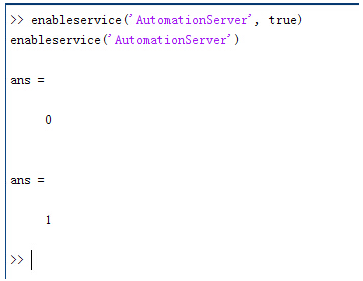 ,zyrBO0 Eq 结果输出为1,这种操作方式保证了当前的Matlab实体可以用于通信。 ;�~q)^.�K3 ?�%0i,p�@< 在winwrp界面,为增加和使用Matlab类型的目录库,我们需要如下步骤: },L[bDOV07 1. 在FRED脚本编辑界面找到参考. �(��c_hX(� 2. 找到Matlab Automation Server Type Library XF$C)id2p� 3. 将名字改为MLAPP XZT( ��:(� (��jyJ-qe �dC�yQCA[ 在Matlab里面有两种常用的数据发送选项PutWorkspaceData 及PutFullMatrix,PutWorkspaceData适用于存储一般的数据在工作区,并赋予其为变量,PutFullMatrix试用于复数数据。 ff�hD+-gTU j�H G(�d$h ,zyrBO0 Eq 结果输出为1,这种操作方式保证了当前的Matlab实体可以用于通信。 ;�~q)^.�K3 ?�%0i,p�@< 在winwrp界面,为增加和使用Matlab类型的目录库,我们需要如下步骤: },L[bDOV07 1. 在FRED脚本编辑界面找到参考. �(��c_hX(� 2. 找到Matlab Automation Server Type Library XF$C)id2p� 3. 将名字改为MLAPP XZT( ��:(� (��jyJ-qe �dC�yQCA[ 在Matlab里面有两种常用的数据发送选项PutWorkspaceData 及PutFullMatrix,PutWorkspaceData适用于存储一般的数据在工作区,并赋予其为变量,PutFullMatrix试用于复数数据。 ff�hD+-gTU j�H G(�d$h 图 编辑/参考 Qqa�f�\$�X &\K#UVDyhh 现在将脚本代码公布如下,此脚本执行如下几个步骤: \%Vo�X`��B 1. 创建Matlab服务器。 y@z��#Jw�< 2. 移动探测面对于前一聚焦面的位置。 DpR%s"�,�Q 3. 在探测面追迹光线 �Z��j0&/�S 4. 在探测面计算照度 �v>�P){VT� 5. 使用PutWorkspaceData发送照度数据到Matlab ��n�C ��Z� 6. 使用PutFullMatrix发送标量场数据到Matlab中 zC^Ib&gm>, 7. 用Matlab画出照度数据 a��b��v��] 8. 在Matlab计算照度平均值 OW�k�K�]�O 9. 返回数据到FRED中 u!S{[7 FY P$QfcJq&c* 代码分享: $7*Ml)H!9� MG@19R�2s� Option Explicit S{H8}m|MW }bTMeC�gI� Sub Main C!P6Z10+j� 3I�x�T2@H) Dim ana As T_ANALYSIS )�,Rj@52l� Dim move As T_OPERATION �KKzvoc?Bt Dim Matlab As MLApp.MLApp G#�*;3�X$� Dim detNode As Long, detSurfNode As Long, anaSurfNode As Long ;vx�9xs?6� Dim raysUsed As Long, nXpx As Long, nYpx As Long _����Owz% Dim irrad() As Double, imagData() As Double, reals() As Double, imags() As Double J5"*�O�H:f Dim z As Double, xMin As Double, xMax As Double, yMin As Double, yMax As Double �xVP�Gl�U� Dim meanVal As Variant �1�&<@(S< �V+q� R�DQ Set Matlab = CreateObject("Matlab.Application") re*/JkDq3K 1XKk~�G�"D ClearOutputWindow hg~fF�j3ST �g�s�3}rW 'Find the node numbers for the entities being used. ;���sf/�tX detNode = FindFullName("Geometry.Screen") k|D!0^H�E[ detSurfNode = FindFullName("Geometry.Screen.Surf 1") �zl[JnVF\6 anaSurfNode = FindFullName("Analysis Surface(s).Analysis 1") |"<
I\Vs: #wyS�?F�P- 'Load the properties of the analysis surface being used. �X�TJ>�y@� LoadAnalysis anaSurfNode, ana '9gI=/29D� ao!r6:&v$e 'Move the detector custom element to the desired z position. @!da1j�N� z = 50 *Gh�R��U5 GetOperation detNode,1,move @n��(In�$ move.Type = "Shift" *Y Z�L��QT move.val3 = z \zUsHK?L"t SetOperation detNode,1,move =�!X4�j3Cv Print "New screen position, z = " &z URgF8?�n�� ;�=OH=+R�l 'Update the model and trace rays. 68*�{Lo?�U EnableTextPrinting (False) �X�n�=fLb( Update �Ln|${�c�� DeleteRays kR��]Sx�G9 TraceCreateDraw \Y�S?}!� 0 EnableTextPrinting (True) hz��%IxI9 EoeEg,'~F� 'Calculate the irradiance for rays on the detector surface. as4NvZ@+�r raysUsed = Irradiance( detSurfNode, -1, ana, irrad ) ����*&�]l� Print raysUsed & " rays were included in the irradiance calculation. ?r<F\rBT7* xJ���hbGK� 'When using real number data to send to MATLAB, it is simplest to use PutWorkspaceData. �D,/9��r�H Matlab.PutWorkspaceData("irradiance_pwd","base",irrad) ����-w�f�V C.-a:oQ[� 'PutFullMatrix is more useful when actually having complex data such as with i�hrrml�N? 'scalar wavefield, for example. Note that the scalarfield array in MATLAB v2�{s2k�B= 'is a complex valued array. ;>9��pJ72r raysUsed = ScalarField ( detSurfNode, -1, ana, reals, imags ) t,,^�^ll� Matlab.PutFullMatrix("scalarfield","base", reals, imags ) m�tH�z6�+ Print raysUsed & " rays were included in the scalar field calculation." �~~��,<+X: `uHp��j`EU 'Calculate plot characteristics from the T_ANALYSIS structure. This information is used 3)a29uc:�U 'to customize the plot figure. DG=Ap:sl*$ xMin = ana.posX+ana.AcellX*(ana.Amin-0.5) ���VHCzl�g xMax = ana.posX+ana.AcellX*(ana.Amax+0.5) K~-XDLh5Nu yMin = ana.posY+ana.BcellY*(ana.Bmin-0.5) �w)n]}k� yMax = ana.posY+ana.BcellY*(ana.Bmax+0.5) `�WS_*f�J5 nXpx = ana.Amax-ana.Amin+1 -�;�$��/�< nYpx = ana.Bmax-ana.Bmin+1 [@Y q^�.6t ��m���9�@n 'Plot the data in Matlab with some parameters calculated from the T_ANALYSIS 59J�9V3n�a 'structure. Set the axes labels, title, colorbar and plot view. m=B0!�Z1xx Matlab.Execute( "figure; surf(linspace("&xMin &","&xMax &","&nXpx &"),linspace("& yMin &"," & yMax & "," & nYpx & "),irradiance_pwd, 'EdgeColor', 'None');" ) rgKn=8+a� Matlab.Execute( "xlabel('X Position (" & GetUnits() & ")')" ) : Matlab.Execute( "ylabel('Y Position (" & GetUnits() & ")')" ) : Matlab.Execute( "zLabel( 'Irradiance' )" ) �Y��;�Gm�, Matlab.Execute( "title('Detector Irradiance')" ) V?BVk�8D}; Matlab.Execute( "colorbar" ) �)6^xIh��� Matlab.Execute( "view(2)" ) oFR'GU�QC Print "" {�2r7:�nvR Print "Matlab figure plotted..." ��_ZBR��<{ ���u$8MVP 'Have Matlab calculate and return the mean value. �o q)��"1� Matlab.Execute( "irrad = mean(mean(irradiance_pwd));" ) �Zi�Yz�sn� Matlab.GetWorkspaceData( "irrad", "base", meanVal ) 5Su�c��#0y Print "The mean irradiance value calculated by Matlab is: " & meanVal (t$/��G3�E mtd���dLd, 'Release resources {PtTPz���� Set Matlab = Nothing &Ld8Z9IeFp �[)>8z8�'f End Sub @�!3^/D�3� !p2,|6Y�`y 最后在Matlab画图如下: 1��iL
x�Xd \|`�Pul$� 并在工作区保存了数据: agT[y�/gb %nf=���[f� 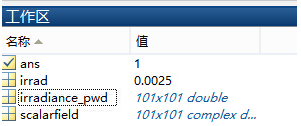 '<S:|$��$� '<S:|$��$�
&W//
Ox
)f 与FRED中计算的照度图对比: h\���\2r>� _)2T�LA
n3 例: 8k?L{hF|nW (Gc`��3�jJ 此例系统数据,可按照此数据建立模型 6F/
Ol�K�<
k�Tc5KH�J7 系统数据 �'xoE
[�0!
7�Sq{A@�ET M�;V#Gm� 光源数据: {<[tYZ�mj. Type: Laser Beam(Gaussian 00 mode) �VQjFE�J�� Beam size: 5; +g�C�y@_2; Grid size: 12; @�a�N��=U= Sample pts: 100; E�iP&Y,vT 相干光; )"jn{%��/t 波长0.5876微米, ����N%|Vzc 距离原点沿着Z轴负方向25mm。 ��b(-t)5^} LY�:��?OGh 对于执行代码,如果想保存图片,请在开始之前一定要执行如下代码: T-2p`b}h�W enableservice('AutomationServer', true) T��xx�B��0 enableservice('AutomationServer') ^^�3va)1{!
|


