-
UID:317649
-
- 注册时间2020-06-19
- 最后登录2026-08-05
- 在线时间1977小时
-
-
访问TA的空间加好友用道具

|
简介:FRED作为COM组件可以实现与Excel、VB、Matlab等调用来完成庞大的计算任务或画图,本文的目的是通过运行一个案例来实现与Matlab的相互调用,在此我们需要借助脚本来完成,此脚本为视为通用型脚本。 c~=���{�A �>#y�1(\e� 配置:在执行调用之前,我们需要在Matlab命令行窗口输入如下命令: ]/|D�CxQ�� enableservice('AutomationServer', true) v�8�TNBsEL enableservice('AutomationServer') �tILnD1�q 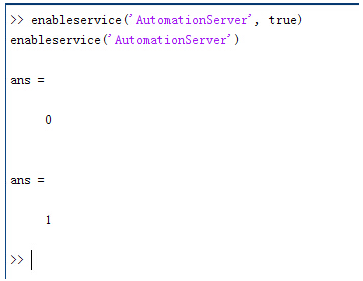 �@9�lG�U�# 结果输出为1,这种操作方式保证了当前的Matlab实体可以用于通信。 �AMN�`bgxW �:�4�)lmIu 在winwrp界面,为增加和使用Matlab类型的目录库,我们需要如下步骤: A:\_ \B%�< 1. 在FRED脚本编辑界面找到参考. H'I5LYsXO~ 2. 找到Matlab Automation Server Type Library !Pu7%�nV. 3. 将名字改为MLAPP ?4�t~z 1.f KV�HK~Y�-G ceLr;}�?Ws 在Matlab里面有两种常用的数据发送选项PutWorkspaceData 及PutFullMatrix,PutWorkspaceData适用于存储一般的数据在工作区,并赋予其为变量,PutFullMatrix试用于复数数据。 GS*_m4.Ry6 ]''�tuo2g8 �@9�lG�U�# 结果输出为1,这种操作方式保证了当前的Matlab实体可以用于通信。 �AMN�`bgxW �:�4�)lmIu 在winwrp界面,为增加和使用Matlab类型的目录库,我们需要如下步骤: A:\_ \B%�< 1. 在FRED脚本编辑界面找到参考. H'I5LYsXO~ 2. 找到Matlab Automation Server Type Library !Pu7%�nV. 3. 将名字改为MLAPP ?4�t~z 1.f KV�HK~Y�-G ceLr;}�?Ws 在Matlab里面有两种常用的数据发送选项PutWorkspaceData 及PutFullMatrix,PutWorkspaceData适用于存储一般的数据在工作区,并赋予其为变量,PutFullMatrix试用于复数数据。 GS*_m4.Ry6 ]''�tuo2g8 图 编辑/参考 D=B�:��tP m/��WDJ$d� 现在将脚本代码公布如下,此脚本执行如下几个步骤: X^C ��$|: 1. 创建Matlab服务器。 d�>/4z#R}- 2. 移动探测面对于前一聚焦面的位置。 +!�t� *LSF 3. 在探测面追迹光线 l�t�HuN;C\ 4. 在探测面计算照度 7'5�/T�]Z� 5. 使用PutWorkspaceData发送照度数据到Matlab f�5R�%F�~� 6. 使用PutFullMatrix发送标量场数据到Matlab中 xE�B��4oQ5 7. 用Matlab画出照度数据 @^`5;Ji�Uk 8. 在Matlab计算照度平均值 /x��/W�>J2 9. 返回数据到FRED中 US��XP��a[ 1(kd�3��qX 代码分享: w_YY~A�f�� ZRUAw,T* Option Explicit #Z]<E6�<=9 !9^G�kFR6n Sub Main XX���*f��� ktv{-WG2_� Dim ana As T_ANALYSIS e�XdH)|l,\ Dim move As T_OPERATION
K4^B~�0~ Dim Matlab As MLApp.MLApp 7�2y!cK��6 Dim detNode As Long, detSurfNode As Long, anaSurfNode As Long mHc2v==X\- Dim raysUsed As Long, nXpx As Long, nYpx As Long B��,�Jn.YX Dim irrad() As Double, imagData() As Double, reals() As Double, imags() As Double d_98%U+��u Dim z As Double, xMin As Double, xMax As Double, yMin As Double, yMax As Double wDs�#1`uTq Dim meanVal As Variant }J=�zO8OL 7.C]ZcU��� Set Matlab = CreateObject("Matlab.Application") K$M,d�-
`b td�C
kvVE ClearOutputWindow &HJ�~\6r�\ ,7e� 2M@=
'Find the node numbers for the entities being used. �4;w#�mzd detNode = FindFullName("Geometry.Screen") �.|K\1qGW0 detSurfNode = FindFullName("Geometry.Screen.Surf 1") 2���aQ}|
` anaSurfNode = FindFullName("Analysis Surface(s).Analysis 1") *kDV ^RBfq �F�RTv��o� 'Load the properties of the analysis surface being used. NO#^_N`#\� LoadAnalysis anaSurfNode, ana wJF�$�<f7P |nO��}YU\E 'Move the detector custom element to the desired z position. q{���.~=~ z = 50 t�aOsC!�Bp GetOperation detNode,1,move 3lNw*M|"�) move.Type = "Shift" P�q�(
�)2B move.val3 = z �5?|P���C. SetOperation detNode,1,move zdDJcdbGd1 Print "New screen position, z = " &z Q�1'D*��F4 �..��^�,*� 'Update the model and trace rays. �.]Z,O�>N� EnableTextPrinting (False) ~#[ ZuMO?� Update ��v a�aZ� DeleteRays [g*]u��3�s TraceCreateDraw �jdVd�z,Y� EnableTextPrinting (True) 4U:+iumy2� �!!t�@��H\ 'Calculate the irradiance for rays on the detector surface. n1c Q�#�u raysUsed = Irradiance( detSurfNode, -1, ana, irrad ) fKT(.VN�q5 Print raysUsed & " rays were included in the irradiance calculation. Z8�Clm�:S� ��fmq^AnKd 'When using real number data to send to MATLAB, it is simplest to use PutWorkspaceData. ��e�3>�k" Matlab.PutWorkspaceData("irradiance_pwd","base",irrad) ts0K"xmY\c �v�6�?<)M% 'PutFullMatrix is more useful when actually having complex data such as with w@��2L�FDp 'scalar wavefield, for example. Note that the scalarfield array in MATLAB v]27+/�a$c 'is a complex valued array. �%���25�_ raysUsed = ScalarField ( detSurfNode, -1, ana, reals, imags ) Ljxn}):[� Matlab.PutFullMatrix("scalarfield","base", reals, imags ) [G|��2�m_� Print raysUsed & " rays were included in the scalar field calculation." 4B�}w;�d@R �|wj�/lX7y 'Calculate plot characteristics from the T_ANALYSIS structure. This information is used �]���R{=|� 'to customize the plot figure. Bf��88�f<Z xMin = ana.posX+ana.AcellX*(ana.Amin-0.5) HI�eMV,.QN xMax = ana.posX+ana.AcellX*(ana.Amax+0.5) OiY2l;�68 yMin = ana.posY+ana.BcellY*(ana.Bmin-0.5) Ic&t_B*i}] yMax = ana.posY+ana.BcellY*(ana.Bmax+0.5) ��"Hj��w�� nXpx = ana.Amax-ana.Amin+1 Xc5�[d�`�] nYpx = ana.Bmax-ana.Bmin+1 vR~*r6�hX8 V2�]S{!p}k 'Plot the data in Matlab with some parameters calculated from the T_ANALYSIS ��o6K�BJx� 'structure. Set the axes labels, title, colorbar and plot view. 6YU2
� �!x Matlab.Execute( "figure; surf(linspace("&xMin &","&xMax &","&nXpx &"),linspace("& yMin &"," & yMax & "," & nYpx & "),irradiance_pwd, 'EdgeColor', 'None');" ) �a^5`fA/L, Matlab.Execute( "xlabel('X Position (" & GetUnits() & ")')" ) : Matlab.Execute( "ylabel('Y Position (" & GetUnits() & ")')" ) : Matlab.Execute( "zLabel( 'Irradiance' )" ) z(��orA} [ Matlab.Execute( "title('Detector Irradiance')" ) J�n�Y�3�]� Matlab.Execute( "colorbar" ) @+X}O��/74 Matlab.Execute( "view(2)" ) e�@,,;YO#4 Print "" Nd!�2 @?V4 Print "Matlab figure plotted..." �r�b�\Ohv\ e?lq�s,m@" 'Have Matlab calculate and return the mean value. W{m0�z+N[B Matlab.Execute( "irrad = mean(mean(irradiance_pwd));" ) \�a]\j�Zb� Matlab.GetWorkspaceData( "irrad", "base", meanVal ) 6e��K^T=�� Print "The mean irradiance value calculated by Matlab is: " & meanVal 83l)o�$S {�R�j'=%h 'Release resources Tcf��BfscU Set Matlab = Nothing -�;`W"&`ss ?��s"v0cg+ End Sub �#1b��g��V M�9OFK\�)� 最后在Matlab画图如下: LMG\j��c?, l��IFU��7g 并在工作区保存了数据: �4QZy-a*tA Gj_b GqF8} 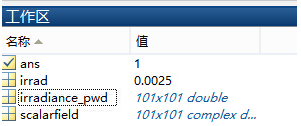 �V_W=MWs&+ �V_W=MWs&+
"^D6%I#T�� 与FRED中计算的照度图对比: ^&�rb��I,D }\*Sf[E�MD 例: E��0DE�FB� Y)��
t}%62 此例系统数据,可按照此数据建立模型 *-Y��w0Y[E
zuP�H3Q�={ 系统数据 o��V!9B-<
X*�y�l%�V
#�dfW�1�@m 光源数据: Hf-F�-~��E Type: Laser Beam(Gaussian 00 mode) hB+ t
p�a Beam size: 5; �TnaIR�J\B Grid size: 12; ���H�YH!�; Sample pts: 100; ~3Y�NHm6V� 相干光; 6�8!f�cK�� 波长0.5876微米, &sRJ��'o�c 距离原点沿着Z轴负方向25mm。 �)y�K�!q�u ��}� ��R/ 对于执行代码,如果想保存图片,请在开始之前一定要执行如下代码: '~�cEdGD9H enableservice('AutomationServer', true) UiEB?X]-l' enableservice('AutomationServer') uR��%�H�"f uR��%�H�"f
|


