-
UID:317649
-
- 注册时间2020-06-19
- 最后登录2026-09-04
- 在线时间1983小时
-
-
访问TA的空间加好友用道具

|
简介:FRED作为COM组件可以实现与Excel、VB、Matlab等调用来完成庞大的计算任务或画图,本文的目的是通过运行一个案例来实现与Matlab的相互调用,在此我们需要借助脚本来完成,此脚本为视为通用型脚本。 qv*�^f�iT� BS�M�w�dr 配置:在执行调用之前,我们需要在Matlab命令行窗口输入如下命令: ��`p7=t)5k enableservice('AutomationServer', true) N36_C;K-z� enableservice('AutomationServer') |W\(kb���+ 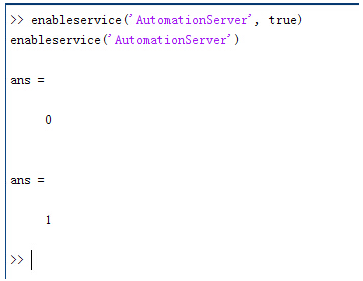 nvUc\7(%NW 结果输出为1,这种操作方式保证了当前的Matlab实体可以用于通信。 ��d M-%�{ ��h-D��}'R 在winwrp界面,为增加和使用Matlab类型的目录库,我们需要如下步骤: JLJ�;TM'4= 1. 在FRED脚本编辑界面找到参考. N�"1B/��u� 2. 找到Matlab Automation Server Type Library OC:T
O|S:4 3. 将名字改为MLAPP �|&[EZ�+[� 3{h_&Gbo'D VY�hbx�
'e 在Matlab里面有两种常用的数据发送选项PutWorkspaceData 及PutFullMatrix,PutWorkspaceData适用于存储一般的数据在工作区,并赋予其为变量,PutFullMatrix试用于复数数据。 !��3v1�bGk �)�tpL#�J� nvUc\7(%NW 结果输出为1,这种操作方式保证了当前的Matlab实体可以用于通信。 ��d M-%�{ ��h-D��}'R 在winwrp界面,为增加和使用Matlab类型的目录库,我们需要如下步骤: JLJ�;TM'4= 1. 在FRED脚本编辑界面找到参考. N�"1B/��u� 2. 找到Matlab Automation Server Type Library OC:T
O|S:4 3. 将名字改为MLAPP �|&[EZ�+[� 3{h_&Gbo'D VY�hbx�
'e 在Matlab里面有两种常用的数据发送选项PutWorkspaceData 及PutFullMatrix,PutWorkspaceData适用于存储一般的数据在工作区,并赋予其为变量,PutFullMatrix试用于复数数据。 !��3v1�bGk �)�tpL#�J� 图 编辑/参考 Z:��7fV5b( �g>9kX�P+� 现在将脚本代码公布如下,此脚本执行如下几个步骤: �6u}�</>�} 1. 创建Matlab服务器。 -)/$M(P�u" 2. 移动探测面对于前一聚焦面的位置。 �Y5d\d\e/ 3. 在探测面追迹光线 I��b0ZjX6� 4. 在探测面计算照度 =��k�qt��� 5. 使用PutWorkspaceData发送照度数据到Matlab kM@zyDn��, 6. 使用PutFullMatrix发送标量场数据到Matlab中 F�r$5RAy�g 7. 用Matlab画出照度数据 �pO.�2��<� 8. 在Matlab计算照度平均值 �R�A�K-UN� 9. 返回数据到FRED中 I)W`�s�BL� TNr� :�pE< 代码分享: Uv�~QUL3>� $D�UZ!zaH! Option Explicit :Xd<7��4Nu TvQ��o�?� Sub Main -FCe:iY! A d5z��`BH. Dim ana As T_ANALYSIS ��=4��!e&o Dim move As T_OPERATION jM�DY(mwt� Dim Matlab As MLApp.MLApp
0nD/�;\OU Dim detNode As Long, detSurfNode As Long, anaSurfNode As Long vFK<J Sk�! Dim raysUsed As Long, nXpx As Long, nYpx As Long CWP2�����{ Dim irrad() As Double, imagData() As Double, reals() As Double, imags() As Double :<#nTh_@\' Dim z As Double, xMin As Double, xMax As Double, yMin As Double, yMax As Double Y�7[jqb1�D Dim meanVal As Variant �Dl8;��$~� 1~QPG\cdIX Set Matlab = CreateObject("Matlab.Application") t>B;�w1�4� �$�"&{aa� ClearOutputWindow 7
^mL_S�Mj �[\�b�0Lem 'Find the node numbers for the entities being used. `I�5wV/%ib detNode = FindFullName("Geometry.Screen") [�=�^3n#WW detSurfNode = FindFullName("Geometry.Screen.Surf 1") oF���Gh�Nk anaSurfNode = FindFullName("Analysis Surface(s).Analysis 1") 6qd\)q6T&x fe#\TNeQJ[ 'Load the properties of the analysis surface being used. x��7x\Y(@ LoadAnalysis anaSurfNode, ana AlW66YAuQ�
U2���~kJ 'Move the detector custom element to the desired z position. 5�RpjN: �3 z = 50 =6|&Jt���� GetOperation detNode,1,move O|N{��v"o� move.Type = "Shift" yN
s,Ll�~ move.val3 = z fLm*�1S|%\ SetOperation detNode,1,move ���M>8A\;" Print "New screen position, z = " &z H_<��C!OgR hz�bw�>g+ 'Update the model and trace rays. Y,e�� �B�| EnableTextPrinting (False) _�8)��*]-� Update Eue~Y�+K*b DeleteRays ?��vH��U�# TraceCreateDraw 1�&(�V���� EnableTextPrinting (True)
)s�p�4Ie� fku<,SV$O4 'Calculate the irradiance for rays on the detector surface. ~�Ti�'F�hN raysUsed = Irradiance( detSurfNode, -1, ana, irrad ) x�6ARz�H\� Print raysUsed & " rays were included in the irradiance calculation. cX�OK�)g#� �����!V g` 'When using real number data to send to MATLAB, it is simplest to use PutWorkspaceData. )$�bS�}��. Matlab.PutWorkspaceData("irradiance_pwd","base",irrad) f/Bp.�Yw�L �@��w!PaP 'PutFullMatrix is more useful when actually having complex data such as with \1 &,�|\E# 'scalar wavefield, for example. Note that the scalarfield array in MATLAB (<oy�N7�NT 'is a complex valued array. 5K?ID�t7A] raysUsed = ScalarField ( detSurfNode, -1, ana, reals, imags ) =j�*$
|X3W Matlab.PutFullMatrix("scalarfield","base", reals, imags ) �Gvqx��i�| Print raysUsed & " rays were included in the scalar field calculation." -FQ 'agf@& ��V0X��vJ
'Calculate plot characteristics from the T_ANALYSIS structure. This information is used �)fSOi|�|C 'to customize the plot figure. Nf�"r4%M<6 xMin = ana.posX+ana.AcellX*(ana.Amin-0.5) �<r`2�)[7N xMax = ana.posX+ana.AcellX*(ana.Amax+0.5) mh�[�7��5( yMin = ana.posY+ana.BcellY*(ana.Bmin-0.5) �;^�I*J:�] yMax = ana.posY+ana.BcellY*(ana.Bmax+0.5) Ab"@7�1�4@ nXpx = ana.Amax-ana.Amin+1 ���K]"��#C nYpx = ana.Bmax-ana.Bmin+1 Ms�GM5(r:b ����FXN/Yq 'Plot the data in Matlab with some parameters calculated from the T_ANALYSIS h�P)LY=-�2 'structure. Set the axes labels, title, colorbar and plot view. qd)�/9*|Jl Matlab.Execute( "figure; surf(linspace("&xMin &","&xMax &","&nXpx &"),linspace("& yMin &"," & yMax & "," & nYpx & "),irradiance_pwd, 'EdgeColor', 'None');" ) dl�@%`E48w Matlab.Execute( "xlabel('X Position (" & GetUnits() & ")')" ) : Matlab.Execute( "ylabel('Y Position (" & GetUnits() & ")')" ) : Matlab.Execute( "zLabel( 'Irradiance' )" ) �[>%xd)8.c Matlab.Execute( "title('Detector Irradiance')" ) }YNR"X9*)/ Matlab.Execute( "colorbar" ) 7.#F,Ue_0T Matlab.Execute( "view(2)" ) t*T�2�Z-!P Print "" �:��Ab�%g- Print "Matlab figure plotted..." 5��V�AK:eB M={V|�H0� 'Have Matlab calculate and return the mean value. ],a5�)�kV Matlab.Execute( "irrad = mean(mean(irradiance_pwd));" ) �1@1U/ss1� Matlab.GetWorkspaceData( "irrad", "base", meanVal ) Rt!�FPoN,y Print "The mean irradiance value calculated by Matlab is: " & meanVal �d]6�#m'�U a�V|hCN��~ 'Release resources 9�1���g2A| Set Matlab = Nothing wlk4�*4dKn Y+�*0�~xm4 End Sub ��j<@lX^�� E:}r5S)��4 最后在Matlab画图如下: A.F738Zp{Z ~W+kiTsD?� 并在工作区保存了数据: /%TI?�?PGu
�&NoS=(s, 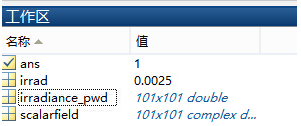 >k�p?vK;'B >k�p?vK;'B
[�8,yF
D_U 与FRED中计算的照度图对比: �Slhe�r0.Y -pGE]�nwDL 例: ]�d0�tE?�9 kDN�:�ep{/ 此例系统数据,可按照此数据建立模型 SO(���NVJh
1Z�~)RJ<�D 系统数据 D�\s���WZ
uPG�4V�2�� D�Sk�/q-'u 光源数据: #�( j�w!d& Type: Laser Beam(Gaussian 00 mode) Vq\�`�+&�A Beam size: 5; Id|L`
��w Grid size: 12; _�Khc3J�o� Sample pts: 100; F�,MO@&ue" 相干光; TbG�n46!�: 波长0.5876微米, ^,�8)iV0j_ 距离原点沿着Z轴负方向25mm。 *q"�.-u!D[ _:C9{aE�Zb 对于执行代码,如果想保存图片,请在开始之前一定要执行如下代码: 27"%�"P.�1 enableservice('AutomationServer', true) e<h�~o!z�a enableservice('AutomationServer') �-[!P�!d= O�8u j`G 9
�PuT@}tw�� QQ:2987619807 80/F7q'tn
|


